✪ See Note Below regarding initial turn on of Computer ✪
Custom Computer running Windows 10 IoT LTSC Enterprise (Windows Updates until January 2032)
Brand New Noctua Rear Case Fan (picture in post) Brand New Energizer CMOS Battery on Motherboard
Extra Large Tower with plenty of room (can be re-used in future with newer hardware)
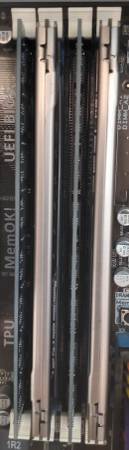
Asus M5A97 Motherboard - AMD FX-4100 Quad-Core Processor - 16 GB DDR3 Memory
Radeon RX550 Series Graphics Card with 2 Large Red Fans with support for DVI, HDMI, or Display Port
Samsung 500 GB SSD Hard Drive & 1-TB Western Digital Standard Sata Hard Drive
⇛ Comes with Power Cord - No Keyboard - No Mouse - No Monitor - No Monitor Cables ⇚
Unit has been configured to automatically backup the SSD Drive to the 1-TB Sata Drive (Full Image) once every 15 days
LG CD/DVD Burner Drive included - Plenty of Room for extra Hard Drives as needed.
Gigabit Ethernet Internet Supported - No WiFi Support, but you can easily add a WiFi Card.
✪ Note: There is one issue (although easy work around). Guessing because the motherboard is older, there is no fix for it, but the workaround is simple. When you first turn the computer on it sits at the Microsoft Windows 10 logo (the blue flags). You simply hit the small reset button on the tower & it will then boot into Windows with no issues. The only time this happens is when you do a full shutdown (regular resets do not cause this issue). I have updated all drivers & the Bios has the latest update from Asus so again it is just an annoying extra step, but once you push the reset button, the computer works fine ✪
★ See Brian's Computer Consulting under Craigslist Computer Repair Section ★